Index
Get Started
How to install Haptic in your project?To add Haptic to your project, simply follow the simple steps below :
- Open the Packages window and select My Assets from the package scope drop-down menu.
- Select the Haptic package from the list of packages. The package information appears in the details panel.
- Click the Install button.
Vibration Styles
To add a VibrationStyle asset, go to
Assets/Create/Abthoclo/Feedback/Haptic/StyleVibrationStyle contain the haptic data used by Haptic. Currently, it only supports low and high frequency, for controllers.
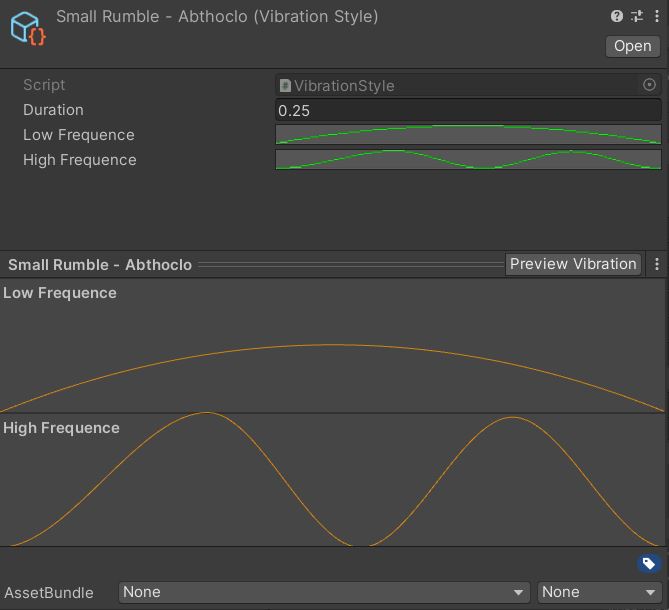 Options
Duration
The duration of the vibration, in seconds.
Low Frequence
Speed of the low-frequency (left) motor. Normalized [0..1] value with 1 indicating maximum speed and 0 indicating the motor is turned off. Will automatically be clamped into range.
High Frequence
Speed of the high-frequency (right) motor. Normalized [0..1] value with 1 indicating maximum speed and 0 indicating the motor is turned off. Will automatically be clamped into range.
Preview Window
The Preview Window shows a visual representation of the VibrationStyle. The 'Preview Vibration' button gives you an example of how the VibrationStyle would feel like.
Vibration Presets
To add a VibrationPresets asset, go to
Assets/Create/Abthoclo/Feedback/Haptic/PresetsA VibrationPresets will force the presets to be included in the project/build, without a reference, and can be called upon by its name.
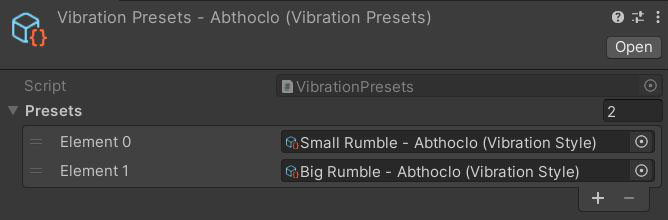 Options
Presets
Contains all the VibrationStyles you want to make available as a preset.
Functions
HapticDescription
Get a sneak peek of the haptic feedback effects in real-time, enabling you to visualize how the controller will respond to different gameplay scenarios. No more guesswork—see it before you feel it!Properties
IsPausedReturns true when the vibration is paused.
IsVibrating
Determine whether a controller is vibrating.
Public Methods
Declaration public static void IsControllerVibrating( int controllerId )Parameters controllerId
The index of the controller.
Description Determine whether the specific controller is vibrating.
Declaration public static void Resume()
Description Resumes the vibration functionalities.
Declaration public static void Pause()
Description Pauses the vibration system.
Declaration public static void Stop()
Description Terminates the vibration for all controllers.
Declaration public static void Stop( int controllerId )
Parameters controllerId
The index of the controller.
Description Terminates the vibration for a specific controller.
Declaration public static void Vibrate( VibrationStyle vibrationStyle, int controllerId = 0 )
Parameters vibrationStyle
The VibrationStyle asset.
controllerId
The index of the controller.
Description Apply vibration by the use of a VibrationStyle.
using UnityEngine;

using Abthoclo.Feedback.Haptic;

// Calling Haptic with a VibrationStyle
public class ExampleClass : MonoBehaviour
{
	public void ApplyVibration(VibrationStyle vibrationStyle )
	{
		Haptic.Vibrate(vibrationStyle);
	}
}
Declaration
public static void Vibrate( string vibrationStyleName, int controllerId = 0 )Parameters vibrationStyleName
The name of the vibrationstyle.
controllerId
The index of the controller.
Description Apply vibration by using a preset VibrationStyle's name.
using UnityEngine;

using Abthoclo.Feedback.Haptic;

// Calling Haptic with a VibrationStyleName, if it is available in a VibrationPresets.
public class ExampleClass : MonoBehaviour
{
	public void ApplyVibration( string vibrationStyleName )
	{
		Haptic.Vibrate(vibrationStyleName);
	}
}
Declaration
public static void Vibrate( float lowFrequence, float highFrequence, int controllerId = 0 )Parameters lowFrequence
Speed of the low-frequency (left) motor. Normalized [0..1] value with 1 indicating maximum speed and 0 indicating the motor is turned off. Will automatically be clamped into range.
highFrequence
Speed of the high-frequency (right) motor. Normalized [0..1] value with 1 indicating maximum speed and 0 indicating the motor is turned off. Will automatically be clamped into range.
controllerId
The index of the controller.
Description Apply vibration for a single frame with a low and high frequence.
using UnityEngine;

using Abthoclo.Feedback.Haptic;

// Calling Haptic with a specific lowFrequence and highFrequence.
public class ExampleClass : MonoBehaviour
{
	public void ApplyVibration( float lowFrequence, float highFrequence)
	{
		Haptic.Vibrate(lowFrequence, highFrequence);
	}
}
Declaration
public static void Vibrate( float lowFrequence, float highFrequence, float duration, int controllerId = 0 )Parameters lowFrequence
Speed of the low-frequency (left) motor. Normalized [0..1] value with 1 indicating maximum speed and 0 indicating the motor is turned off. Will automatically be clamped into range.
highFrequence
Speed of the high-frequency (right) motor. Normalized [0..1] value with 1 indicating maximum speed and 0 indicating the motor is turned off. Will automatically be clamped into range.
duration
The duration of the vibration, in seconds.
controllerId
The index of the controller.
Description Apply vibration for a fixed duration with a low and high frequence.
using UnityEngine;

using Abthoclo.Feedback.Haptic;

// Calling Haptic with a specific lowFrequence, highFrequence and duration.
public class ExampleClass : MonoBehaviour
{
	public void ApplyVibration( float lowFrequence, float highFrequence, float duration)
	{
		Haptic.Vibrate(lowFrequence, highFrequence, duration);
	}
}